AI In BusinessHow to Start Using AI in Your Business: Six Steps to a First Result in 30 Days
The short answer
To start using AI in your business, pick one repetitive task that costs time, such as drafting emails or summarizing customer messages. Choose a general-purpose AI assistant or a tool built for that task, set a clear success measure, and run a small pilot for about two to four weeks. Check every output, keep sensitive data out of tools you have not vetted, and expand only when the result holds up.
The short version: To start using AI in your business, pick one repetitive task that takes up too much of your time, choose a tool that can handle it, set a clear way to judge the result, and run a short pilot to test it. This guide walks you through that process over 30 days, from choosing the task to deciding whether to expand.
You will finish with one working AI workflow and a written record of what it saved, what it got wrong, and what you would change. Most owners already complain about the same work: drafting replies, summarizing customer messages, and pulling together a weekly update. Those tasks are repetitive, easy to check, and low-risk to try first.
Each step is short and gives you something to do the same day. You will see where to look for your first task, how to compare tools on published specifications and vendor claims, and how to set a measure you can check against real output.
This guide is based on published specifications and what buyers report, not our own testing.
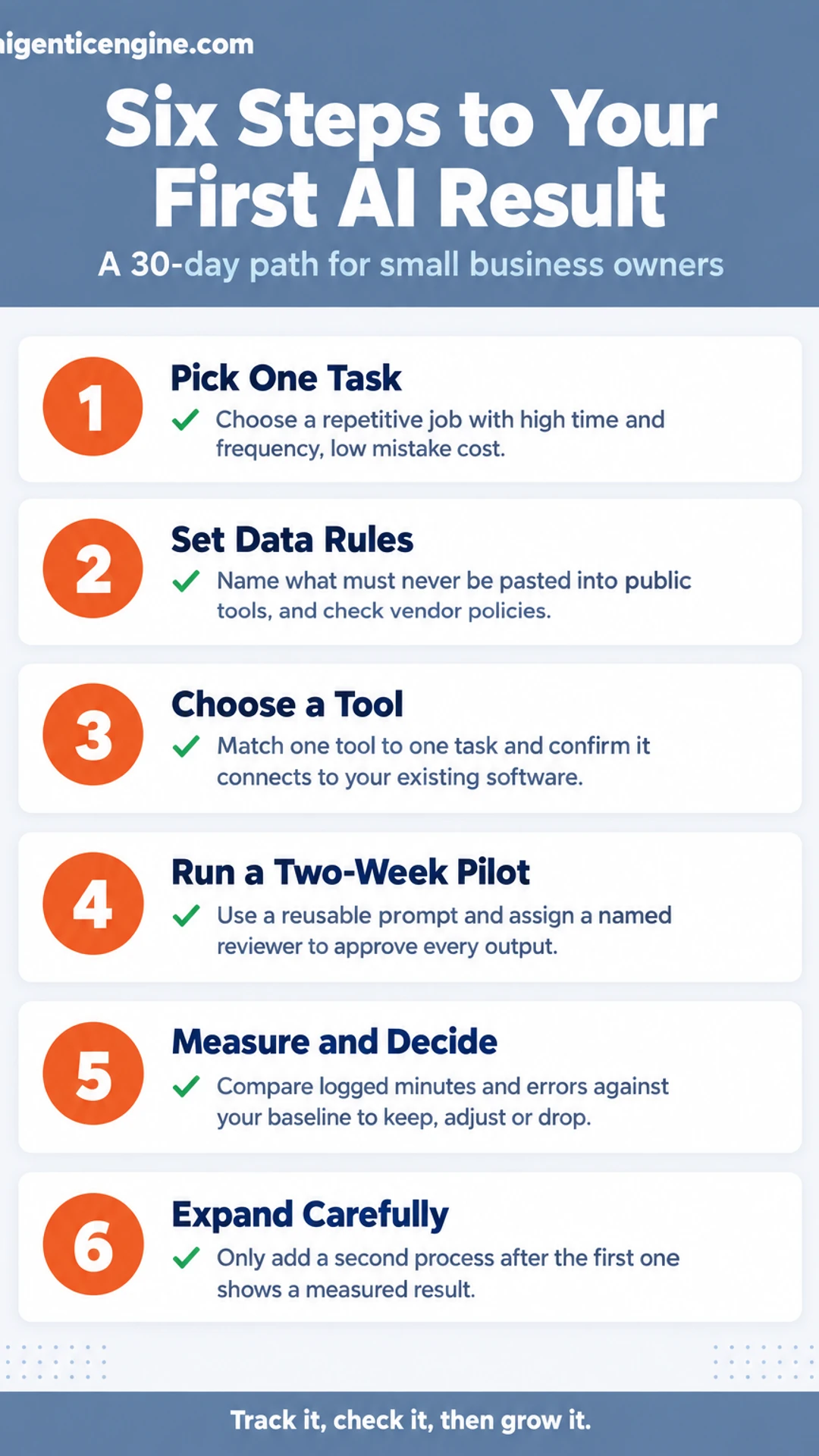
Quick steps:
- Pick one task and define what success looks like
- Set your data and usage rules
- Choose a tool that fits the task
- Run a two-week pilot with a human check
- Measure the result and decide
- Expand carefully into a second process
Missed Call Revenue Leak Calculator
Step 1: Pick one task and define what success looks like
Start by listing the work that quietly drains your week. Most businesses have a handful of repetitive tasks that feel small but add up: scheduling meetings, writing first drafts of emails or social posts, copying figures between spreadsheets, or answering the same customer questions again and again. Write down every one you can think of. Aim for at least ten.
Next, score each task on three things, from 1 (low) to 5 (high):
- Time spent: How many hours a week does it take?
- Frequency: How often does it happen?
- Cost of a mistake: How much damage does a wrong result cause?
Add the first two scores and subtract the third. The best pilot is high on time and frequency, and low on mistake cost. A task you can check easily and fix quickly makes a safer first experiment than anything touching payroll or legal terms.
For example, a small bookkeeping firm might list "answering the same tax-deadline questions by email." It takes about 4 hours a week, happens daily, and a slightly off reply is easy to correct. That beats "preparing client tax filings," which is slow to check and expensive to get wrong.
Pick the top-scoring task. Then write one measure of success before you start. Keep it simple and countable:
- Minutes saved per week
- Average response time to customers
- Number of drafts you finish per day
Write it on paper or in a doc, with a baseline number. For the email example: "Current average reply time is 6 hours. Goal: under 1 hour within 30 days."
[screenshot: a simple spreadsheet with columns for task, time per week, frequency, mistake cost and total score]
Choosing a pilot task
| Task type | Why it works | Why it may not |
|---|---|---|
| Email drafts and replies | Frequent, easy to check | Tone errors reach customers |
| Summarizing notes | Repetitive, low risk | Missed details if unchecked |
| Tax or legal filings | Not stated | Slow to check, costly to get wrong |
Step 2: Set your data and usage rules
Before anyone on your team opens an AI app, decide what information is allowed to go into it. This takes about an hour, and it protects your customers and your business from avoidable mistakes.
Start with a short "never paste" list. Write down the categories of information that stay out of public tools. A practical starting list:
- Customer personal details, such as names tied to contact info, addresses, payment details or account numbers
- Passwords, API keys and login credentials
- Unreleased financials, pricing plans and board materials
- Signed contracts and any document marked confidential
Pin this list where your team will see it, such as your shared drive or your onboarding document.
Check each vendor's data policy before signing up. Look for the terms about data retention and model training. Search the vendor's site for "data retention," "training" or "privacy." Note three things: whether your inputs are used to train the model, how long they are kept, and whether you can turn off training in settings. Then compare the free tier with the paid plan, since free versions often allow training on your inputs while business plans commonly do not. Vendors change these terms, so recheck them every few months.
Decide who approves new tools. Name one person, often the owner or an operations lead, who signs off before any staff member adopts a new tool. Give that person a simple request form with the tool name, its purpose, the data it will touch and the policy you checked. Approval can take a day. It keeps your data rules from being bypassed one sign-up at a time.
[screenshot: a sample one-page data rules sheet with the never-paste list, the approved tools table and the approver's name]
Step 3: Choose a tool that fits the task
Start by narrowing your list. Pick one job you want help with first, then match it to one or two tools. Testing ten products at once wastes time and makes results hard to judge.
Option A: Start with a general AI assistant. For drafting, summarizing and brainstorming, a general assistant is usually the easiest place to start. Tools such as ChatGPT, Claude and Gemini each offer free or low-cost tiers, so you can test without a subscription. Check each vendor's pricing page for current limits, since they change often.
Option B: Match a specialist app to a specific job. If your goal is email follow-up or scheduling, compare apps built for that purpose:
- Open each vendor's published feature list.
- Look for the exact action you need, such as sending sequences or booking meetings.
- Note any usage caps, seat limits and setup requirements.
Confirm integrations before you commit. An app that cannot connect to your existing software creates copy-and-paste work, which cancels out the time you hoped to save. Make a short checklist:
- Does it connect to your email, CRM or spreadsheets?
- Is that connection included in your plan, or is it an add-on?
- Does the vendor list the integration on its own site?
Example: A small consulting firm wants faster follow-up on inbound inquiries. It lists its email provider and CRM, then checks three specialist apps against that list. Only one lists both connections on its public integrations page, and its cost includes them, so that app moves to the test shortlist.
[screenshot: a vendor's integrations page with the email and CRM connections highlighted]
Keep the test small. Choose one app, run it on one task for two weeks, and record how much time it saves your team.
Where to start with an AI tool
| Approach | Best for | How to start |
|---|---|---|
| General AI assistant | Drafting, summarizing, brainstorming | Test free or low-cost tier |
| Specialist app | Email follow-up, scheduling | Compare published feature lists |
Step 4: Run a two-week pilot with a human check
Now you test your chosen tool on a real task from your business. The goal is a working result you can judge, not a perfect one. Keep a person responsible for every output, and track what happens so the decision at the end rests on evidence.
What you need:
- One recurring task, such as drafting customer email replies, summarizing call notes, or writing product descriptions
- A named reviewer who checks each output before it reaches a customer or informs a decision
- A simple log, either a spreadsheet or a notebook
How to run it:
- Write a reusable prompt template. Use the same structure every time: role, task, input, and output format. For example: "You are a support assistant for a small bakery. Draft a reply to the customer message below. Keep it under 80 words, and flag anything about refunds for review. Message: [paste message]."
- Assign one reviewer. Put a specific name next to every output. That person reads it, edits it if needed, and approves it. Nothing goes out unreviewed.
- Log each day. Record minutes spent, number of outputs, number approved as-is, number edited, and any errors.
[screenshot: a spreadsheet with columns for date, task, minutes spent, outputs approved, outputs edited, and errors]
At the end of two weeks, compare total minutes against your old process. That gap, plus your error count, tells you whether to keep, adjust, or drop the tool.
Step 5: Measure the result and decide
Open the log you started in Step 1. Your baseline is the reference point for this whole decision, so pull it up before you look at anything from the last few weeks.
Gather three numbers for the workflow you piloted:
- Logged time: total minutes spent on the task each week, using the same method you used for the baseline.
- Error count: how many outputs needed correction, rework or a resend.
- Output volume: how many units you completed, such as emails sent, records updated or reports produced.
Put the baseline and the pilot side by side in a simple table. For example, if your team spent 90 minutes a week drafting customer follow-up emails and made 6 errors, and the pilot shows 40 minutes and 4 errors, you have a clear, measurable answer.
Then choose one of three paths:
- Keep: The time saving holds and errors are manageable. Write the workflow down as a repeatable process: the exact prompt, the tool, who reviews the output and what a good result looks like. Assign an owner.
- Adjust: The result is close but not there. Change the prompt or tool once, run the workflow for another week and measure again.
- Stop: The result is still weak after that one adjustment. Record why in your log and move on to a different task.
Be honest with yourself here. Stopping a pilot that did not pay off is a successful outcome of the 30 days, because you now know where AI does not help your business.
Step 6: Expand carefully into a second process
Once your first AI task produces a result you trust, resist the urge to pick the most exciting idea on your list. Pick the next task from your scored list instead, and ideally choose one in the same department. Sales can reuse the lead-intake rules you already wrote. Marketing can reuse the content templates and the approval step. Each reuse saves time and keeps your approach consistent.
Here is how to do it:
- Open your scored list and filter for tasks in the same department as your first win.
- Check what you can reuse. Look at your written data rules, prompt templates, and review checklist. Note which ones fit the new task without changes.
- Run a small pilot. Apply the same six-step method to the new task, limited to one week or a handful of records.
- Compare the result to the old process. Measure time spent and error rate, the same way you did for step one.
For example, a small agency that used ChatGPT to draft client email replies can expand carefully by using the same tone guide and approval step to draft onboarding emails for new customers. The rules carry over, so the second task takes days rather than weeks.
Then set a monthly review. Block 30 minutes on the calendar and check four things:
- Tools: which ones you use, and whether each still earns its place
- Costs: subscription and usage fees against the time they save
- Data rules: whether anyone broke them, and whether they still fit
- Outcomes: the results you measured for each task
Finally, train your team on the written rules. Walk through the rules in one short session, have each person run one task, and store the document where everyone can find it. That way the approach outlasts the person who started it.
What to do now
- ☐ Pick one task and score it for time spent, frequency and mistake cost
- ☐ Write one measure of success with a baseline number before you start
- ☐ Write a never-paste list of information that stays out of AI tools
- ☐ Check each vendor's data policy on retention and model training
- ☐ Name one person who approves new AI tools before staff adopt them
- ☐ Shortlist one or two tools and confirm they connect to your existing software
- ☐ Run a two-week pilot with a reusable prompt and a named human reviewer
- ☐ Log minutes, outputs and errors daily, then compare the pilot to your baseline
Frequently asked questions
How can AI help business?
AI helps most with repetitive, text-heavy or pattern-based work: drafting emails, sorting incoming requests, summarizing calls, pulling figures into reports and flagging unusual numbers. The gain is usually time back for people, faster response to customers and fewer manual errors. It works best when a specific task is clear and someone reviews the output before it reaches a customer.
What is the 10/20-70 rule for AI?
The 10/20-70 rule is a guideline that splits AI effort across three areas: about 10 percent on the algorithms, 20 percent on the technology and data, and 70 percent on people and process changes. The idea is that most AI projects stall because of workflow and adoption problems rather than the model itself. For a small business, it is a reminder to plan how the team will use the tool, not just which tool to buy.
What are 5 benefits of AI?
Five common benefits are time savings on routine tasks, faster responses to customers, more consistent output, better use of existing data for decisions, and the ability to handle more volume without adding headcount at the same rate. None of these is automatic. Each depends on picking a specific task, measuring the before and after, and checking that the output meets your standard.
How to use AI to make $10,000 a month?
No AI method guarantees a fixed income, and any promise of a set monthly figure should be treated with caution. A more reliable approach is to pick one service or product, use AI to shorten a costly part of delivering it, and track whether that cuts your costs or lifts your sales. Revenue then grows from real demand you can measure, not from a promised number.
How long does it take to start using AI in a business?
Many small businesses can run a first, limited test within a few days and judge the result within about 30 days. The timeline depends on how clearly the task is defined and how much review the output needs. A narrow starting point, such as drafting one type of routine email, is far quicker to evaluate than a company-wide rollout.
Conclusion
Every method in this guide starts with one small task, so the first step is simply choosing it.
Look at your week and find the task that eats the most time without needing much judgment.
Decide whether you will begin with the task definition, the test run or the review step.
Whichever you pick first, write down the current time it takes so you can measure the change.
Share this: X · LinkedIn · Facebook
Summarize with AI: ChatGPT · Claude · Perplexity
Leave a Reply