
AI In BusinessHow to Use AI to Qualify Sales Leads Automatically: 6 Steps
The short answer
AI lead qualification uses software to score, prioritize, and route sales leads automatically. It checks each lead against criteria you define, such as company fit, role, budget signals, and engagement, then sends high-fit leads to sales and nurtures the rest. Setting clear criteria and clean CRM data before choosing a tool is what makes it work.
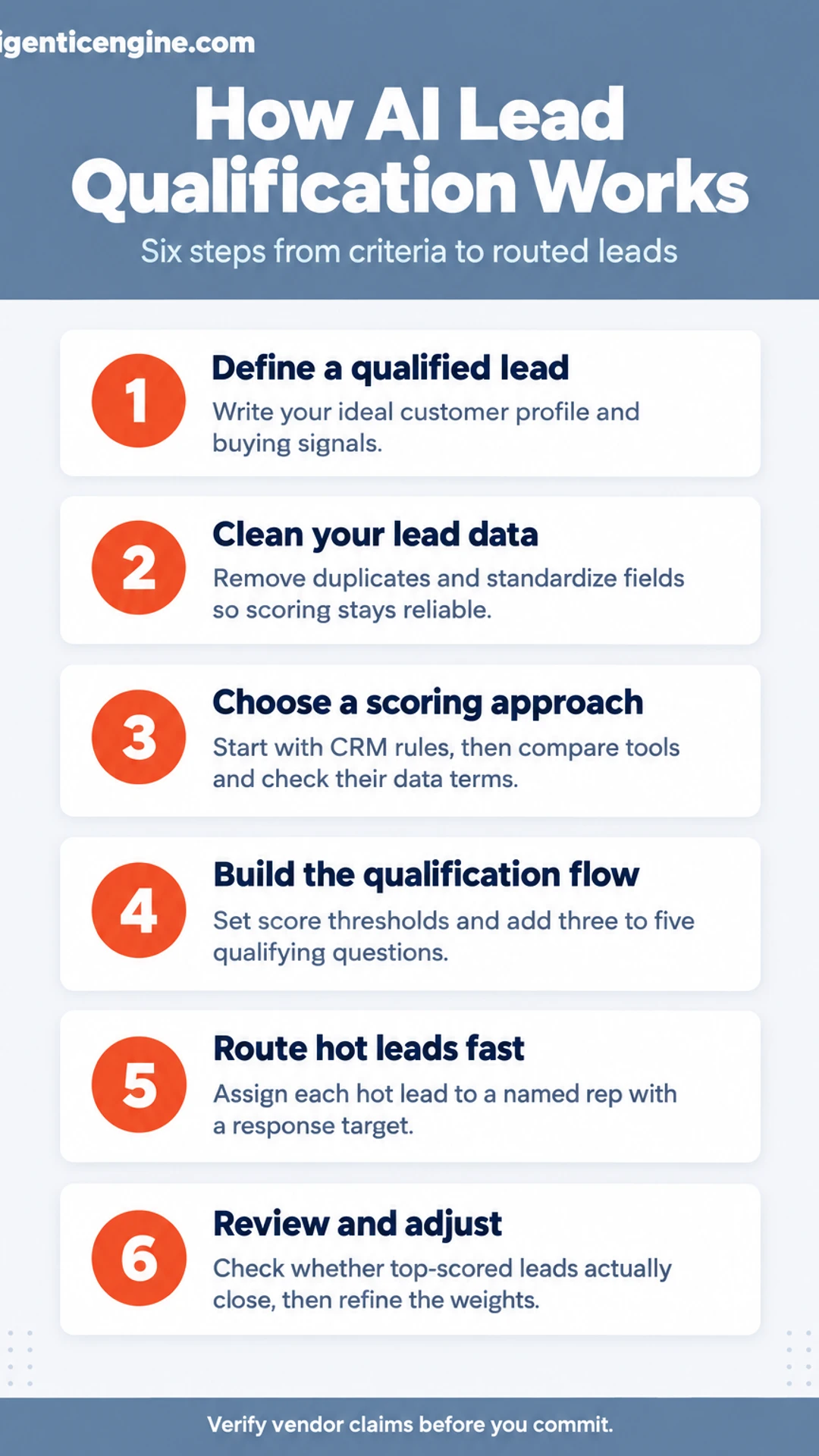
This guide walks you through setting up automatic lead qualification from start to finish, so your sales team spends its time on the prospects most likely to buy. Here is what the guide covers:
- What you need: the data, criteria, and tools to have in place before you start.
- Step by step: six stages from defining your ideal customer to routing scored leads to the right person.
- Mistakes to avoid: the setup errors that quietly send bad leads to your sales team.
- Our take: where automation helps most and where a human should still make the call.
Most of what follows is built from published tool specifications, vendors' own claims (which we attribute to them), and what buyers commonly report, not our own testing. Treat vendor claims as starting points to verify.
Every step is written so you can apply it to your own pipeline. You will be able to define a scoring model in plain terms, check whether your CRM data can support it, and set up routing rules that send high-fit leads to sales within a single working day. If you want the wider picture first, the hub page at aigenticengine.com and our guide to starting with AI in 30 days both give useful context.
Manual Lead Qualification Cost Calculator
Step 1: Define what a qualified lead looks like
Before you touch any tool, write down what a good lead looks like for your business. Every scoring model and every automated filter depends on these criteria, and if they are vague, your AI will sort leads by guesswork. Give this step an hour and you will save weeks of cleaning up bad data later.
Start with your ideal customer profile (ICP). Write it as a short list:
- Industry: Which sectors buy from you most often?
- Company size: Employee count or annual revenue range.
- Location: Countries, states or cities you can serve.
- Buyer role: The job title of the person who signs off, and of the person who influences the decision.
Next, list the signals that show interest. Think about what a prospect does, not just who they are. Common examples include visiting your pricing page, requesting a demo, replying to an email, or downloading a comparison guide.
For example, a marketing agency serving retail brands might decide: a lead is a Head of Marketing at a retailer with 50 to 500 staff in the US, who visits the pricing page and replies to a follow-up email. Those three signals are now measurable.
Finally, sort your criteria into two groups:
- Must-haves: A lead without these is not qualified (for example, the right industry and location).
- Nice-to-haves: These add points but do not disqualify (for example, a recent funding round).
Agree on this split with your sales reps so everyone works from the same definition.
[screenshot: a spreadsheet with columns for criterion, type (must-have or nice-to-have) and the signal that proves it]
Step 2: Get your lead data ready
Your AI can only qualify leads as well as the data it reads. If your records are full of duplicates, blank fields, and mismatched labels, the scoring will be unreliable from the start. This step is about cleaning what you already have so the AI has something solid to work with.
Remove duplicates and fill in the key fields. Export your leads from your CRM and sort by email address. Merge repeated contacts so each person appears once. Then make sure every record has the core fields: company, role, lead source, and contact details.
- Open the export in a spreadsheet and sort by email.
- Merge duplicates, keeping the most recent activity.
- Fill blanks where you can. If a field is unknown, mark it "Unknown" instead of leaving it empty.
Standardize fields so the same value is always written the same way. "Tech," "technology," and "Tech Co" will be read as three different industries. Choose one spelling for each industry and one format for company size, such as "1-10," "11-50," and "51-200." Apply the same rule to every record.
Check how leads arrive, and record each source. Leads may come from web forms, email, chat, or CSV imports. List every channel, then note which fields each one captures. A web form might collect company size while a chat transcript does not. Write this down so you know where gaps are likely.
Example: A marketing agency with 1,200 contacts found 180 duplicates. After merging them and standardizing industry labels, the team could finally see which sources sent the most qualified leads.
[screenshot: CRM export sorted by email, with duplicate rows highlighted]
Step 3: Choose a scoring approach and a tool
Before you pick software, decide how you want your scoring to work. Start with simple rule-based scoring inside your CRM. It takes less time to set up, and it shows you the logic behind every score. Once you understand which signals actually predict a sale, AI scoring makes far more sense.
Start with rules. Open your CRM and find its lead scoring settings. In HubSpot, these live under the scoring properties in your contact settings. Add points for behaviors and fit, for example:
- +10 for a job title that matches your buyer
- +15 for a company in your target size range
- +5 for opening an email, and +15 for a reply
- +20 for visiting your pricing page
- Subtract points for free-email domains or no activity in 60 days
Run this for two to four weeks. Check whether your highest-scoring leads close more often than the rest. If they do not, adjust the weights. This manual approach shows you what a good lead looks like in your own data.
Compare the two main tool types.
- CRM-native scoring (HubSpot scoring, Salesforce Einstein): Best if you already use that CRM. Data stays in one place, and setup is usually handled in the same interface. Check which features require a paid tier.
- Standalone qualification tools: Better when your CRM is basic or you need scoring across several sources. These usually cost extra and require integration work.
Check the vendor's own documentation. For each tool, read the published specifications, the list of supported integrations, and the data-handling terms. Look for where data is stored, whether it is used to train models, and how you can delete it. Treat marketing claims as the starting point for questions, not as proof. Ask the vendor for their documentation on these points before you sign.
Decision checklist:
- I have a written list of my scoring rules
- I know which tier of my CRM includes native scoring
- I have confirmed the integrations I need in vendor docs
- I have read the data-handling terms
[screenshot: CRM lead scoring settings page showing property-based point rules]
Scoring approaches compared
| Approach | Best when | Trade-off |
|---|---|---|
| Rule-based scoring in CRM | You want to see the logic behind every score | Needs manual weight adjustments over time |
| CRM-native AI scoring | You already use that CRM and keep data in one place | Some features need a paid tier |
| Standalone qualification tool | Your CRM is basic or you score across several sources | Usually costs extra and requires integration work |
Step 4: Build the qualification flow
Scoring tells you who a lead is. Questions fill the gaps. Routing decides what happens next. This step connects all three so a lead moves from first contact to the right owner without you touching it.
Set score thresholds and map each tier to an action. Look at the scores from your scoring model (company size, role, budget signals, and intent actions such as pricing page visits). Pick two cut-off points that split the list into three tiers:
- Hot: above the upper threshold. Route to a rep now.
- Warm: between the thresholds. Enroll in a nurture email sequence.
- Cold: below the lower threshold. Keep in your CRM and recheck later.
Write each tier and its action in one line in a shared document so everyone uses the same rules.
Add a short set of qualifying questions. Most leads arrive with gaps, such as no budget figure or no timeline. Add three to five questions to your form or chatbot, for example: "What problem are you solving?", "When do you want to start?", and "Roughly what budget do you have in mind?" Keep it short. Long forms lower completion, and each answer should feed a field in your CRM.
Route hot leads to a named rep with a response target. Assign each hot lead to one person, not "the sales team." Set a clear target, such as contact within one business day or sooner, and create an alert so the rep sees it immediately.
Example: A marketing agency sets hot as a score of 70 or higher. A lead who answers "this month" and "over $5,000" gets assigned to Dana within minutes, with a task due the same day.
[screenshot: CRM workflow showing score-based branches to "Assign rep" and "Start nurture sequence"]
Lead tier actions
| Tier | What you do |
|---|---|
| Hot | Route to a named rep now |
| Warm | Enroll in a nurture email sequence |
| Cold | Keep in CRM and recheck later |
Step 5: Test against real outcomes
Before you trust the AI's scores, check them against what actually happened. A score only earns its place if high-scored leads turn into closed deals more often than low-scored ones.
Run the new scoring alongside your current process for a fixed period, such as 30 to 60 days. Keep your existing qualification method in place so your reps still work leads the way they always have. The AI scores each new lead in the background, and nobody acts on those scores yet.
At the end of the period, pull the data from your CRM and compare:
- Which leads the AI rated highest, and how many of them closed
- Which leads the AI rated lowest, and whether any of those closed anyway
- Where your reps' judgment and the AI's score disagreed, and who was right
For example, say a marketing agency scores 200 inbound leads over 45 days. The AI puts 40 leads in its top tier, and 12 of those close, a 30% win rate. The bottom tier has 80 leads and 2 close. That spread tells you the scoring is doing real work. If instead the top tier closed no more often than the bottom tier, the criteria are not predicting anything.
Then adjust. Where the scores and outcomes disagree, look for the cause:
- A criterion that looks strong but rarely appears in winning deals (lower its weight)
- A signal your best reps rely on that the model ignores (add it)
- Lead sources that score high but never convert (reduce their weight)
Rerun the comparison after each change. You are ready to rely on the scores when the top tier consistently outperforms the rest.
[screenshot: CRM report comparing win rate by AI score tier]
Step 6: Review on a schedule and keep humans in the loop
Once your scoring is live, it can drift. Your offer changes, your market shifts, and a rule that worked in the spring can quietly misfire by summer. Set up checks now so the system stays honest.
Set a recurring review date. Put a 30-minute monthly meeting on your calendar and pull three numbers each time:
- Score accuracy: Take 20 leads from the last month, split between high and low scores. Mark which ones turned into real conversations. High scores that go cold, or low scores that closed, tell you where the rules need work.
- Response times: Check how long it takes from lead capture to first contact. Hot leads should move quickly.
- Lead volume: Compare counts by source. A sudden drop often points to a broken form or a changed filter, not a slow month.
[screenshot: a simple CRM report showing these three numbers side by side]
Let reps flag bad scores. Add a "scored wrongly" field or tag in your CRM. When a rep marks a lead, note the reason in a few words, such as "too small for our minimum" or "decision maker missing." Each Friday, read the flags and adjust one rule at a time so you can see what changed.
Keep a person on big or unusual accounts. Automation should handle the routine. Any lead above your deal-size threshold, or from an industry you rarely serve, goes to a named person for a final call. This protects revenue and keeps the reps who know your clients in control.
What to do now
- ☐ Write down your ideal customer profile: industry, company size, location, and buyer role
- ☐ List the buyer signals to track, such as pricing page visits and demo requests
- ☐ Sort your criteria into must-haves and nice-to-haves, and agree on the split with your reps
- ☐ Remove duplicate records and fill in the core fields, marking unknowns as Unknown
- ☐ Standardize field values so the same industry and size formats are used everywhere
- ☐ Record each lead source and note which fields it captures
- ☐ Set up rule-based scoring in your CRM and run it for two to four weeks
- ☐ Set score thresholds for hot, warm, and cold leads, and map each tier to an action
Frequently asked questions
What is lead qualification in CRM?
Lead qualification in a CRM is the process of deciding which contacts are worth a salesperson's time. Each lead record is checked against criteria such as budget, decision-making authority, need and timing. Leads that meet the criteria move forward to sales, and the rest are nurtured or closed out, so the team works on the prospects most likely to buy.
What does an AI leader do?
An AI leader usually refers to someone who sets the direction for artificial intelligence inside an organization. The role typically covers choosing which business problems AI should address, managing vendors and data, setting guidelines for responsible use, and training staff. In a small business, the owner or a senior manager often takes on these duties themselves.
What is scoring in AI?
In AI lead scoring, a model assigns each lead a number, often from 0 to 100, that estimates how likely it is to convert. The score is built from signals such as company size, job title, pages visited and email replies. Sales reps then start with the highest-scoring leads instead of working through the list in random order.
How to make $1000 a day using AI?
No reliable method guarantees $1,000 a day from AI, and claims that promise a fixed income should be treated with caution. AI can reduce the time spent on tasks like lead sorting or report writing, which may free up hours for paid work. Any income depends on your offer, your market and how consistently you sell.
Conclusion
Which of these six steps will you try first?
If your team has never scored leads, start with step 2 and define what a qualified lead looks like.
If your lead list is already built, step 4 is probably where the quickest time savings are.
Whichever you pick, run it on a small batch of real leads before you roll it out to everyone.
Share this: X · LinkedIn · Facebook
Summarize with AI: ChatGPT · Claude · Perplexity