AI In BusinessWhat AI Can Actually Do for a Small Business Today
The short answer
AI for small business today is best at handling repetitive, language-heavy and data-heavy work: drafting and sorting messages, summarising documents, answering routine customer questions, spotting patterns in sales and finance records, and producing first drafts of marketing content. It does not replace owner judgment, reliable data or human review of customer-facing output, and results depend heavily on how well the tool is set up and fed.
You already know the frustration. Your inbox fills faster than you can answer it, your reports take an afternoon to assemble, and the tools you bought promised to save time but added another login. That is a fair complaint, and it deserves a clearer answer than the hype you keep seeing.
This guide will show you what AI can realistically do for your business right now, how it works in plain terms, and where it tends to fall short. You will see practical examples across sales, operations and reporting, along with a note on what this means for agencies. Our take at the end gives you a straightforward way to decide where to begin.
This guide is based on published specifications and what buyers report, not our own testing.
What the sections cover:
- The short answer: the tasks AI handles well today, in one place.
- How it works: the basic mechanics, so you can judge tools without jargon.
- Why it matters: where AI changes cost, speed and capacity for a small firm.
- Our take: a practical starting point and the checks to make before you buy.
For the wider picture, start with the hub at aigenticengine.com, and see how to start using AI in your business in 30 days if you want a step-by-step plan.
Where AI tools come from
| Tool type | Best for |
|---|---|
| Built into existing software | Adding AI inside tools your team already uses |
| Standalone product | More specialized work connected to your systems |
AI Total Cost of Ownership Calculator
AI in Business Calculator: Which Workflows to Automate First
The Short Answer: What AI Does Well for Small Businesses
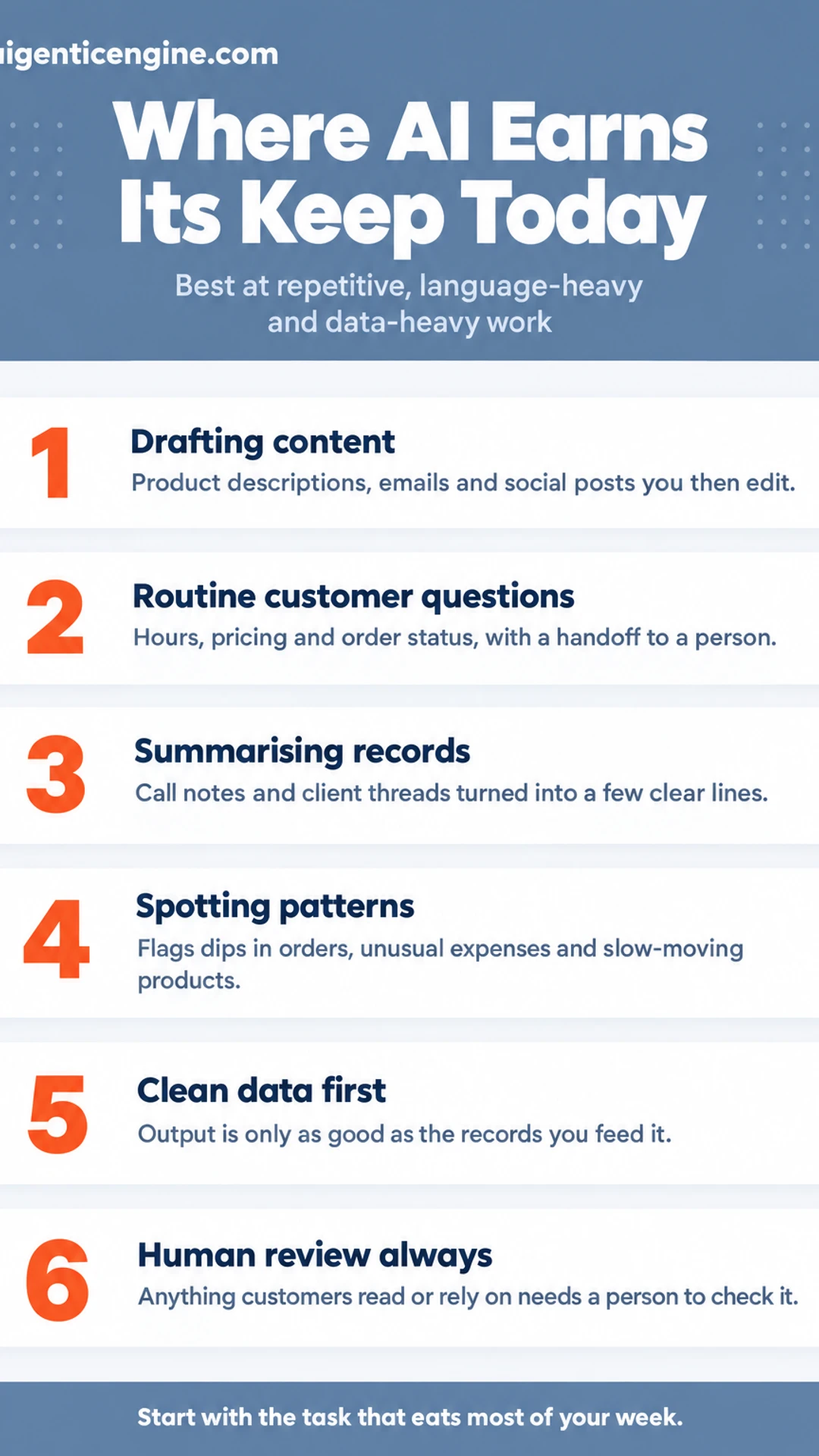
AI is software that finds patterns in data and then produces something from them: a draft of text, an image, or a prediction about what is likely to happen next. For a small business, that means it can take over repetitive writing and sorting work, so you and your staff spend more of your day on decisions only people can make.
The tools that earn their place today tend to do four things well:
- Drafting content. Product descriptions, email drafts, social posts and first-pass marketing copy that you then edit.
- Answering routine customer questions. Hours, pricing, order status and other common queries, handled by a chatbot trained on your own information.
- Summarising records. Turning long call notes, client threads or meeting transcripts into a few clear lines.
- Flagging patterns in sales and finance. Spotting a dip in repeat orders, an unusual expense or a slow-moving product before it becomes a problem.
The limits matter just as much. AI can be wrong, sometimes confidently so. Its output is only as good as the data you feed it, so messy spreadsheets produce messy insights. Anything a customer will read or rely on needs a person to check it first.
Used with those limits in mind, these tools help small businesses work faster and see more, without needing a large team behind them.
How AI Works Inside a Small Business
Most AI tools follow the same basic loop, and once you see it, evaluating any product gets much easier. You supply an input: a question, a document, a spreadsheet of client records. The tool passes that input through a trained model, which has learned patterns from very large amounts of text or data. It then returns an output, a draft, a summary, a score or a forecast. Your job is to review that output before you act on it.
Why does the quality of your data matter so much?
The output can only be as good as what goes in. If your customer records have duplicate entries, missing fields or outdated contact details, the tool will work from that mess and produce unreliable results. Cleaning up your data first is often the least glamorous step, and the one that most affects whether AI helps your business at all.
Which tools should you look for?
Broadly, there are two kinds:
- Built into software you already use. Google Workspace with Gemini and Notion AI are examples. These add AI features inside tools your team already opens every day, so there is less to set up and less to manage.
- Standalone products. These are separate applications you connect to your existing systems. They can do more specialized work, but they usually take more time to set up and to keep connected.
Neither is automatically better. Start with the tools your team already uses, and check the vendor's published specifications and documentation before you buy anything.
Where AI Fits: Core Business Functions
Most small businesses don't need AI to do something new. They need it to take some of the repetitive work off the people who already do the job. Here is how that tends to look across the functions a small business runs, based on published product specifications and what buyers commonly report.
Customer service and inquiries
- Routing incoming messages to the right person or queue
- Drafting replies to common questions for a human to review before sending
- Answering routine questions, such as opening hours or order status, with a clear handoff to a person when a question falls outside its scope
Good setups always include an escalation path. You want the tool to know when to stop and pass the conversation to you or your team. Many small businesses start here because the volume is high and the answers are often repeated.
Marketing and content
- Drafting social posts, email copy and product descriptions
- Producing several options quickly so you can pick the tone that fits your brand
Treat every draft as a first pass. Accuracy, pricing and brand voice still need your edit before anything goes out.
Sales support and operations
- Summarising call notes and organising leads
- Standardising recurring tasks so they happen the same way every time
We cover this area in more depth elsewhere in this hub. For now, it is enough to know that this is where much of the hours-saving potential sits.
Finance and reporting
- Categorising expenses from receipts and bank feeds
- Tracking invoices and flagging overdue payments
- Surfacing trends from data you already hold, so you can spot a slow month early
Your existing records are the real asset here. The cleaner your data, the more useful the insights.
Why It Matters for a Small Business
The real value of AI for small business is not that it replaces people. It takes over the repetitive parts of the day so the people you have can spend their hours on the work that needs them. That matters most when one or two people are covering sales, admin, customer questions and bookkeeping at the same time. In that situation, a few hours of recovered time each week can be the difference between reacting to the inbox and planning ahead.
Here is where the practical gains tend to show up:
- Time recovered from repetitive tasks. Drafting standard replies, sorting incoming requests and copying details between systems add up quickly. Automating them frees hours you can redirect to clients.
- Faster access to information you already keep. If your sales records, invoices and client notes are in reasonable shape, AI tools can search and summarise them. That makes decisions less dependent on memory and on who happens to remember last quarter.
- Lower overhead on certain tasks. Some jobs cost less to run with these tools. The savings vary widely, so measure them against your own current costs before you assume a number.
- A more level field. Capabilities that once required a specialist on staff are now available through off-the-shelf tools. Several published small business guides make this point, and it is often the most useful one for a firm without a large team.
Start with the task that eats the most of your week, and measure the result against what it costs you today.
What to Check Before You Buy or Start
Before you commit money or staff time to any AI tool, run it through a short checklist. The goal is simple: know where your data goes, confirm the tool fits how you already work, and have a way out if it doesn't. This section is based on published vendor specifications and what buyers commonly report, not on our own testing.
Where does your data go, and who can use it?
Read the vendor's published privacy and data policy before you upload anything. Confirm:
- Where your data is stored and whether that location suits your obligations
- Whether your inputs are used to train the vendor's models, and whether you can opt out
- How you delete your data, and whether deletion covers backups
Customer records and financial details deserve the closest look.
Does it connect to the software you already use?
A tool that sits apart from your email, CRM or accounting system often creates more copy-and-paste work, not less. Check whether it offers native integrations with the platforms you rely on, or whether you would need a third-party connector or manual exports.
Can you run a small, measurable pilot?
Pick one task, such as drafting customer follow-up emails or summarising weekly sales notes. Set a fixed period, often two to four weeks, and decide in advance how you will judge success: minutes saved per task, or a quality check against your current work.
How easily can you leave?
Ask how you would export your data, in what format, and whether you keep access after cancelling. Know the notice period and any contract terms. A tool that is hard to exit is a tool you should be cautious about adopting.
Our Take: Start Narrow and Keep People in the Loop
Our view is that small businesses should start with one repetitive task rather than a broad rollout. Pick something you do the same way every week, such as sorting inbound enquiries, drafting follow-up emails or pulling a standard weekly summary. A single task gives you a clear before-and-after comparison and keeps the cost of a mistake small.
How do you choose that first task? Look for work that is frequent, rule-based and low-risk if it goes wrong. Avoid anything that depends on judgement you have not yet written down.
We also think human review of anything a customer sees is non-negotiable at this stage of the technology. AI tools can produce confident-sounding errors, so a person should check every customer-facing message, quote or piece of content before it goes out. Treat the output as a first draft, not a finished product.
What should you clean up before you begin? In our view, the best first step is usually cleaning up the records and processes AI will depend on. If your customer data is duplicated, your contact fields are inconsistent or your process lives only in someone's head, an AI tool will simply repeat those problems faster. Tidy the data, write the steps down and agree on who signs off.
- Choose one repetitive task with a clear owner.
- Document the current steps and the rules behind them.
- Clean up the records the tool will read.
- Keep a person reviewing anything a customer sees.
- Compare results against the old way before expanding.
Starting this way keeps your team in control and makes it easier to see whether a tool is genuinely saving time.
Frequently asked questions
What is the best AI for a small business?
There is no single best option. The right tool depends on the job. A general assistant such as ChatGPT, Claude or Gemini suits drafting, summarising and research. Dedicated tools handle narrower jobs like scheduling, invoicing or client messages. Start with one task that eats your time, then compare two or three tools against it using a free trial.
How to use AI to make $10,000 a month?
AI does not produce income on its own. It can cut the time a service or product takes, letting you serve more clients or bill more hours. Any revenue goal still depends on demand, pricing and sales effort. Treat AI as a way to free capacity for those activities, not as a guaranteed income source or a shortcut around them.
How can AI be used in small businesses?
Common uses include drafting emails and social posts, answering routine customer questions, sorting incoming leads, summarising meeting notes, creating simple reports and organising invoices. Each use saves time on repetitive work. The most useful starting point is usually the task you repeat most often each week.
What is the 30% rule for AI?
The 30% rule is a loose guideline, not an official standard, and its meaning varies by source. Some people use it to suggest that roughly a third of a team's routine tasks could be handled with AI assistance. Treat it as a prompt to look at your workflow, and measure your own results rather than relying on the number.
Do I need technical skills to use AI in my business?
Most everyday AI tools are built for non-technical users and work through a web browser or app. Writing clear instructions, checking outputs and knowing what information is safe to share matter more than coding. Basic familiarity with your existing software usually makes adoption easier than any programming knowledge would.
Wrapping up
AI can take over repetitive, time-consuming tasks, but it works best when you pick one specific problem first.
Start small, measure the time you save, and check every output before it reaches a customer.
Which routine task in your business would you most like to hand off? Share it in the comments.
Share this: X · LinkedIn · Facebook
Summarize with AI: ChatGPT · Claude · Perplexity