The short answer
AI in business means using software that can learn patterns from data to perform tasks such as answering customer questions, summarizing documents, forecasting demand or drafting content. To start, list the repetitive tasks that take the most time, check whether your data is accessible, choose one tool for one task, and measure the result against your current process before expanding.
Here is the opening answer, lightly edited so it reads smoothly:
AI in business means software that learns patterns from data to perform tasks such as answering customer questions, summarizing documents, forecasting demand or drafting content. To begin, list the repetitive tasks that consume the most time, confirm that the information behind them is accessible, choose one tool for one task, and measure the result against your current process before expanding.
What this guide covers:
- The first task: how to pick the one workflow worth automating and why it should be a small, routine one.
- Data readiness: a plain checklist for finding out whether your information is in a form an AI tool can actually use.
- Tool selection: what to compare across published specifications, vendor claims and what buyers commonly report.
- Measurement: how to set a baseline before you begin so you can judge the result honestly.
- Scaling up: when and how to move from one task to several without losing control.
By the end of this guide, you will have chosen one task in your business, confirmed your information is usable, selected a tool, and set up a way to compare its results against how the work was done before. This guide is based on published specifications and what buyers report, not on our own testing.
You do not need a technical team to follow it. The steps are written for business owners, small teams and agencies who want a working result rather than a long theory lesson. If you are new to the vocabulary, our AI glossary for business owners explains the key terms. Our page on what AI can actually do for a small business today sets realistic expectations before you spend anything.
Once you have finished this page, you will know your first task and have a measurement plan ready. From there, the related guides on AI for sales and prospecting, AI for operations and reporting, and the agency model cover the next steps in more depth.
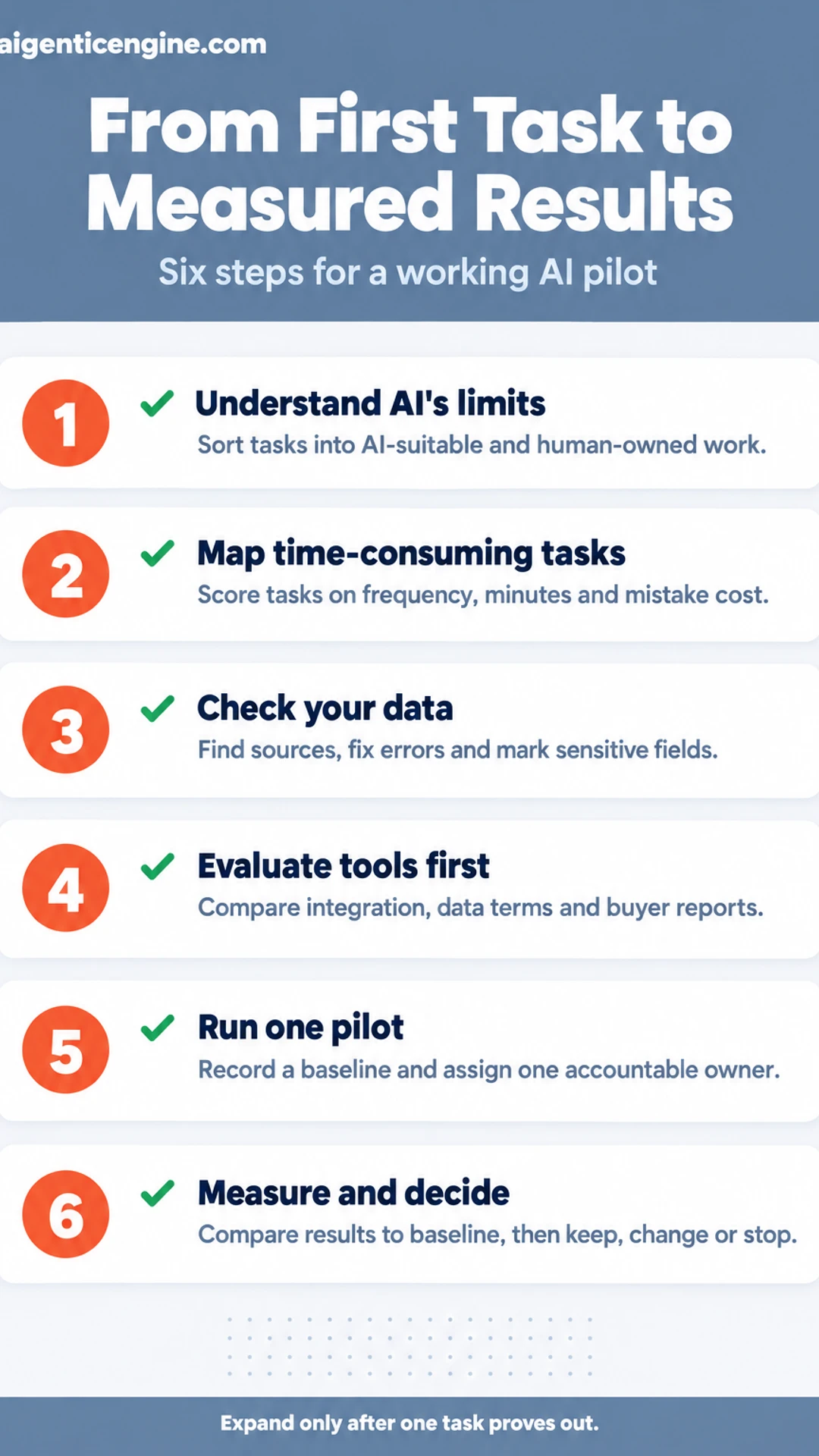
The six steps at a glance
| Step | What you do |
|---|---|
| Step 1: Understand what AI can and cannot do | Sort tasks into AI-suitable and human-owned |
| Step 2: Map the tasks that eat your time | Score tasks on frequency, minutes and mistake cost |
| Step 3: Check your data and access | Find data sources, clean errors, mark sensitive fields |
| Step 4: Evaluate tools before you buy | Compare tools on integration, data terms and reports |
| Step 5: Run one pilot with a clear owner | Record a baseline, then pilot with one accountable person |
| Step 6: Measure, decide and expand | Compare to baseline, then Keep, Change or Stop each task |
Guides on this site
Step 1: Understand What AI Can and Cannot Do for Your Business
Start here before you buy anything. In business terms, artificial intelligence is software that finds patterns in information and then produces a prediction, a piece of text, or a recommended decision based on those patterns. It does not understand your business the way your staff does. It works from the examples and inputs you give it, so the quality of its output depends heavily on the quality of those inputs and on how clearly you describe the task.
Sort your work into two groups. AI handles the first group well:
- Drafting: first versions of emails, product descriptions, or proposal outlines
- Sorting: tagging incoming support tickets or leads by type and urgency
- Summarizing: condensing call notes, meeting transcripts, or long customer threads
- Routing: sending a request to the right person or queue
Keep these with people, because they carry judgment, accountability, or relationship weight:
- Pricing approvals and discount decisions
- Hiring and performance decisions
- Client disputes and anything involving a complaint or legal exposure
AI output can be wrong, and it can sound confident while being wrong. Match your review effort to the cost of a mistake. A draft social post can go out after a quick read. A contract figure or a message to an upset customer needs a careful check by someone who knows the facts.
[screenshot: a two-column table listing your current tasks, with "AI-suitable" and "Human-owned" as headers]
Step 2: Map the Tasks That Eat Your Time
Start by listing the work that keeps coming back. Your goal is a short, ranked list of candidate tasks for AI, not a full inventory of everything your business does.
Work through four areas: sales, operations, marketing and customer service. For each one, ask your people what they repeat every week. Good candidates include lead follow-up emails, invoice reminders, reporting pulled from spreadsheets, social post scheduling and answers to the same customer questions.
Write each task on its own line in a shared document. Then score every task on three measures:
- Frequency: How many times a week does it happen?
- Minutes per occurrence: How long does one instance take, including setup and cleanup?
- Cost of a mistake: What happens if the task goes wrong? Rate it low, medium or high.
Multiply frequency by minutes to get weekly hours. Then shortlist three tasks that are frequent, time-consuming and low-risk. Those three are your first candidates.
For example, a five-person marketing agency might list "send weekly client status updates." It runs every Monday for twelve clients, takes about 20 minutes each, and a small wording error costs little. That scores high on the first two measures and low on risk, so it earns a place on the shortlist.
[screenshot: a shared spreadsheet with columns for task, area, frequency, minutes, mistake cost and weekly hours]
Step 3: Check Your Data and Access
Before any AI application can help with a task, it needs the right information, and that information has to be accurate and allowed to leave your hands. This step answers three questions for each task on your shortlist: where the information lives, whether it is clean enough to use, and what must stay private.
Find where the information lives. Write down each source the task depends on. Common homes include:
- CRM (customer records, deal history, contact notes)
- Spreadsheets (price lists, inventory, job schedules)
- Inboxes (quote requests, customer questions)
- Documents (contracts, service guides, policies)
[screenshot: a simple table with columns for Task, Data source, Owner, and Who can export it]
Take a sales follow-up task as an example. The leads sit in your CRM, the pricing lives in a spreadsheet, and the follow-up templates sit in a shared document. That is three sources, and each one needs an owner.
Clean the obvious problems. You do not need a perfect database, but you do need to fix the errors that would mislead an AI tool:
- Merge duplicate contacts so one customer does not receive two messages.
- Fill in required fields like company name, service type, and region.
- Replace outdated price lists with the current version, and archive the old ones.
Decide what stays out. Some information should never enter a third-party tool, including payment details, health or personal identifiers, and private staff records. Mark each field as "share," "redact," or "keep internal." Then check whether your vendor's terms allow the information to be used for training, and choose settings that turn that off where possible. Good privacy habits protect your customers and your business, and they make your later security review much simpler.
Checklist before you move on:
- Every task has a named data source and owner.
- Duplicates and missing fields are fixed for the records you will use.
- Every sensitive field has a "keep internal" or "redact" label.
Step 4: Evaluate Tools Before You Buy
Before you commit to any AI product, put two or three candidates side by side against a written checklist. Vendor websites rarely make comparison easy, so you will get clearer decisions by building your own scorecard first. Start by listing your needs: which business tasks the tool must handle, which team members will use it, and how much information it will touch.
Work through these three checks for each tool:
- Integration and data portability. Confirm the tool connects to the software you already use, such as your CRM, email platform or spreadsheets. If it doesn't, check whether you can export your information in a usable format like CSV. Lock-in is the cost most buyers overlook.
- Data terms and security. Read the vendor's data policy. Find out whether your inputs are stored, whether they are used to train models, and whether you can delete them. Check the security measures the vendor describes. Pay particular attention to customer information, since it may carry privacy obligations.
- Specifications, claims and buyer reports. Compare published specifications and the vendor's own claims side by side, and attribute each claim to its source. Then look at what existing buyers report about accuracy, reliability and support response times in independent reviews.
Example: Suppose you run a six-person agency and are choosing a tool to draft client reports. Tool A connects directly to your reporting platform and deletes inputs on request. Tool B requires manual CSV uploads and its terms say inputs may be used for training. Tool A wins on two of three checks, and that comparison makes the decision for you.
[screenshot: a sample scorecard with three tool columns and rows for integration, data terms, specifications and buyer feedback]
Once you have scored each tool, shortlist the one that best matches your team's needs and your privacy obligations. For more on defining those needs, see our guide to AI basics for business.
Step 5: Run One Pilot With a Clear Owner
A pilot only teaches you something when one person is accountable for it. Without an owner, the trial drifts, nobody reviews the results, and you end up with a vague sense that "AI didn't really help." Choose one person on your team, ideally someone who already does the task and understands its quality standards. Give them the time to run it, typically a few hours a week for the length of the trial, and make them responsible for two things: running the pilot and writing the review.
Before anything changes, record a baseline for the task you are testing. Capture two numbers:
- Time: how long the task takes from start to finish, averaged over a handful of recent instances.
- Error rate: how often the output needs correction or rework, counted over the same sample.
Write these down. Without a baseline, you cannot judge whether the tool improved anything.
For example, say you run a small marketing agency and want to test an AI tool for drafting client monthly summaries. Your account coordinator, Maria, times ten summaries over two weeks at about 45 minutes each and flags four that needed factual corrections. That is her baseline. Her pilot then covers the next 30 summaries, with the tool producing the first draft and Maria reviewing every one before it goes to a client.
Keep a human approval step until the output has been checked on a meaningful sample. Do not switch it off because the first few drafts look good. Compare the pilot results against the baseline, and only then decide whether to reduce the review.
[screenshot: a simple tracking sheet with columns for date, task ID, minutes spent, errors found, and reviewer initials]
Step 6: Measure, Decide, and Expand
Start by comparing your pilot against the baseline you recorded before you began. Pull the same three numbers for each task: time saved per week, error rate, and output quality. Score quality with a simple rubric, such as a 1 to 5 rating from a reviewer who did not produce the work. Your baseline is the reason this comparison means anything, so skip the step only if you never recorded one.
Next, log what your team found hard. Ask each person to write down where the tool slowed them down, where they had to correct it, and where they stopped using it. Fix those process gaps first: unclear inputs, missing approval steps, or no owner for reviewing output. Adding another tool to a broken process only multiplies the problem.
Then decide each task with one of three verdicts:
- Keep: the task met your target on time, errors, and quality.
- Change: the task showed promise, but one measure fell short. Adjust the prompt, the input format, or the review step, then run it again.
- Stop: the task missed target after a fair fix attempt.
Example: A small marketing agency piloted AI for first drafts of client reports. The baseline showed about 3 hours per report. After four weeks, drafting took about 1.5 hours, but reviewers flagged wrong figures in one of every five drafts. The team kept the drafting step, added a mandatory number check, and stopped using the tool for the analysis section.
Expand only into tasks marked Keep. Revisit your shortlist every quarter, because models, prices, and your own business needs all change.
Verdicts for each pilot task
| Verdict | When it applies | Next action |
|---|---|---|
| Keep | Met target on time, errors and quality | Expand to more work |
| Change | Promising, but one measure fell short | Adjust prompt, input or review, rerun |
| Stop | Missed target after a fair fix attempt | Drop the task from the tool |
What to do now
- ☐ List the repetitive tasks that take the most time in your business
- ☐ Check whether the information each task needs is accessible
- ☐ Choose one tool for one task
- ☐ Pick the one workflow worth automating, a small and routine one to start
- ☐ Name a data source and owner for each task on your shortlist
- ☐ Fix duplicate contacts, missing fields and outdated price lists
- ☐ Record a baseline of time and error rate before you start
- ☐ Measure the pilot against the baseline, then decide to keep, change or stop
Frequently asked questions
What is AI in business terms?
In business terms, AI means software that performs tasks which normally need human judgment, such as sorting incoming leads, drafting replies, spotting patterns in sales information or flagging an unusual invoice. It is usually a practical tool applied to one step of a process, not a single system that runs the whole company. The useful question is which repetitive decision or task it can take over.
Which of the following is a common application of AI in the field of digital marketing?
A common application is audience segmentation and personalization, where AI groups customers by behavior and tailors email subjects, ad creative or product recommendations to each group. Content drafting, ad bid adjustment and predicting which leads are most likely to convert are also widespread. Each of these works best when a person reviews the output before it reaches customers.
How can AI help a business make money?
No reliable method guarantees a set income, and claims promising a specific monthly figure often rely on courses or get-rich schemes. A realistic path is to pick one service you can deliver, such as lead research or content production for local businesses, use AI to shorten your delivery time, and price the work so your margin holds. Income then depends on the clients you win and keep.
What is the 10/20-70 rule for AI?
The 10/20-70 rule is a planning guideline often cited in AI adoption discussions, suggesting that roughly 10 percent of effort goes to algorithms, 20 percent to technology and data, and 70 percent to people, process and change management. It is a rule of thumb rather than a measured law, and the exact split is debated. Its main value is reminding businesses that workflow and staff readiness matter as much as the model.
Where should a small business begin with AI?
Start with one repetitive task that takes real hours each week, such as sorting inbound emails or compiling a weekly sales summary. Run it manually for a short period to document the steps, then test an AI tool on that single task and compare results against your baseline. Expand only after the first task produces measurable time savings or fewer errors.
Conclusion
Every AI project starts with a single task, so the first decision is the smallest useful one.
Which step will you try first: the 30-day starting plan, lead qualification, or the reporting automation?
Pick one, write down how long it takes you now, and use that number as your baseline.
You can find the rest of the hub at aigenticengine.com, starting with the basics of AI for business.
Share this: X · LinkedIn · Facebook
Summarize with AI: ChatGPT · Claude · Perplexity